2015-05-04
A couple of people mocked my use of shell in my last post, so I thought
I'd write up a couple of problems I solved this week, to allow me to laugh at the solutions in the
future, and, more importantly, for you to laugh at them now.
White-space has been inserted into the examples for bloggability, but all these are what I actually wrote,
as one-liners.
Downloading matching files
I've got the http:// URL of an indexed directory,
which contains a load of large files. I want to download all the files with -perl and .html in their
names.
First thought: wget probably has a flag for this:
wget -np --mirror --accept='*-perl*.html' https://example.com/foo/
This actually produces the right output, but... it downloads all the files, then deletes the ones that it
doesn't want to keep. My guess is that it's sucking links out of the intermediate files. Maybe this could
be fixed by limiting the recursion depth, instead of using mirror? This isn't what I did, however:
curl https://example.com/foo/ | \
   cut -d'"' -f 8 | \
   fgrep -- -perl | \
   sed 's,^,https://example.com/foo/,' | \
   wget -i-
Yep, that works. Very unix-y solution, every tool only doing one thing.
Breaks horribly if the input is wrong. Fast, as it only looks at files it needs, and wget manages a
connection pool for you (whereas for u in $urls; wget $u wouldn't).
Line counts in a git repository
I've got a checkout of a git repository, and I want to know roughly how many lines of production code
there are in it. It's a Java codebase, so most production code is in */src/main or client/src.
find -maxdepth 3 -name main -o -name client | xargs sloccount
Why didn't I use -exec here? Probably paranoid of -exec with -o. Correct solution:
find -maxdepth 3 \( -name main -o -name client \) -exec sloccount {} +
Two massive problems, anyway:
- There's a load of generated or downloaded code in those directories; build output, downloaded modules, ...
sloccount really hates taking multiple directories as input, especially when they have the
same (base)name, and just ignores some of them.
Next up, let's use git ls-files to skip ignored files:
git ls-files | egrep 'src/main|client/src' | xargs cat | wc -l
Barfs as there's white-space in the file names, which I wasn't expecting.
Could probably work around it with some:
... | while read line; do cat $line; done | wc -l
...but we may as well fix the real problem. git ls-files has -z for null-terminated output, and
xargs has -0 for null-terminated input. grep has -Z for null-terminated output... but I couldn't
find anything that would make it take null-terminated entries as input. Sigh.
Wait, it's git. We can just clone the repo. (cdt
cds to a new temporary directory)
cdt; git clone ~/code/repo .
...then we can use find again:
find \( \
        -name \*.java -iwholename '*src/main*' \
    -o \
        -name \*.js -iwholename '*client*' \
\) -exec cat {} + | \
grep -v '^$' | \
egrep -v '^[ \t]*//' | \
wc -l
Close enough to the expected numbers! Now, let's backfill graphite:
(for rev in $(g rev-list --all | sed '1~50p'); do
    g co -q $rev
    echo code.production $(!!) $(g show --format=%at | head -n1)
) | grep -v ' 0 ' | nc localhost 2444
Woo!
2015-04-22
I spend a reasonable portion of my life dealing with Medium Data: columnar files (typically CSV)
you can easily fit on disc, can easily fit in disc cache after compression, and can
probably fit in RAM after some pre-processing; files slightly too big to open in
modern versions of Excel, and far, far too big for LibreOffice Calc or Apple's Pages.
Sometimes, I like to load these files into a database table to have a look around; say,
to look at the distinct values in some columns. I was slightly surprised to find, however,
that
most
database
engines
have a column limit around the 1,000-2,000 column mark.
I've got a fat dataset, ~2,000 columns, 600MB total. Let's load it into Postgres anyway.
My first attempt was to insert it directly from psycopg2
(all operations inside a single transaction):
for line in file:
    cur.execute("""insert into big values (%s)""", (line,))
This results in binaries all over your db (thanks, Python!), and takes ~90s.
Fixing:
cur.execute("""insert into big values (%s)""", (line.decode('utf-8'),))
...gets it down to 60s. I'm not sure where the performance is coming from here. More
efficient/aggressive compression for
TOASTing of the non-binary text,
even though it's bit-identical (as all the data is (close enough) to low-ascii)?
More likely that the wire format and/or the driver code for strings has had more love.
Right! Data's in the db. Can't turn it into columns directly, so ... wait, there's no limit on array
lengths!
create table arrays as select regexp_split_to_array(line, E'\t') arr from big;
... yeah. Well, it was a good idea. I didn't wait for this to complete, but I estimate 1h45m. Not
sure what's slow here... maybe compiling the regexp, or it not expecting such a large array to be
returned, such as would happen if you were heavily optimised for statements like:
... regexp_split_to_array(line, E'\t')[3] ...
Never mind. Python can probably do a better job!
cur.execute("""insert into arr values (%s)""", (line.decode('utf-8').split('\t'),))
Much to my surprise, Python actually does do a better job. 8m55s, around 50% of the time spent in Python,
so would probably be a lot faster in a non-naive implementation, or after a JIT had fixed it up.
This table is actually usable:
select max(array_length(line, 1)) from arr2;
...
Execution time: 1971.869 ms
Good sign! Right, now, on to some data analysis. Let's look at the distinct values in each column:
echo select $(for i in {1..1959};echo "count(distinct line[$i]) line$i,") \
    | sed 's/,$/ from arr;/' \
    | psql -U big -x
For those that don't read shell, or are confused by the zshisms, this generates:
select count(distinct line[1]) line1, count(distinct line[2]) line2, ... from arr;
And it returns:
ERROR: target lists can have at most 1664 entries
I actually had to look this error up. You can't select more than that totally random number
of results at a time. Bah! I set it going on 1,600 columns, but also got bored of that running after
around 20m.
It's worth noting at this point that Postgres does most operations on a single thread, and that this
isn't considered a serious problem. It's not ideal for many of my usecases, but it's also not all that
hard to get some parallelism in the client.
Let's parallelise the client:
P=8
COLS=1959
echo {1..$COLS} | xargs -n $(($COLS/$P+$P)) -P $P \
    zsh -c 'echo select $(for i in "$@"; echo "count(distinct line[$i]) line$i,")' \
    '| sed "s/,\$/ from arr;/"' \
    '| psql -U big -x'
(I really need to find a good way to manage parallelism in shell without xargs. Wait, no. I really need
to stop writing things like this in shell.)
This takes around 17m total, and consumes a minimum of 20gb of RAM. But, at least it works!
For comparison:
- pandas can ingest and compute basic stats on the file
in ~1m / 6gb RAM (although it's cheating and only supporting numerics).
- shell (
cut -f $i | sort -u | wc -l) would take about 1h20m.
- Naive Java implementation took me 4m to write from scratch, and takes about 35s to compute the answer.
In summary: Don't use Postgres for this, and Java wins, as usual.
Continue reading...
2015-04-10
I have started using lxc extensively. It's reasonably easy to
set up lxc on modern Ubuntu (I would argue that
it's easier than Docker), and, with it's ability to run as a limited user, is much more security friendly.
It also gels much better with the way I think about virtualisation and services; I don't want to be locked-in
to a vendor specific way of thinking or deploying.
All my tools and my muscle memory already understand ssh and shell.
A (long, oops) while ago, I spent a while diagnosing an interesting issue. Upon reboot, nginx would be
unable to talk to some lxcs, but not others. This would persist for an annoyingly long time; restarting
things would have very little effect.
It turned out that dnsmasq, which the Ubuntu setup
uses for dhcp and dns resolution on containers, has some very
non-ideal behaviour
(spoilers). Let's have a look.
First, let's try and resolve a machine that's turned off:
% lxc-ls -f example
NAME    STATE    IPV4  IPV6  GROUPS  AUTOSTART
----------------------------------------------
example STOPPED  -     -     -       NO

% dig -t A example @10.0.3.1; dig -t AAAA example @10.0.3.1

;; ->>HEADER<<- opcode: QUERY, status: NXDOMAIN, id: 44338
;; flags: qr rd ra; QUERY: 1, ANSWER: 0, AUTHORITY: 1, ADDITIONAL: 1

;example.               IN  A

;; ->>HEADER<<- opcode: QUERY, status: NXDOMAIN, id: 23299
;; flags: qr rd ra; QUERY: 1, ANSWER: 0, AUTHORITY: 1, ADDITIONAL: 1

;example.                IN  AAAA
Here, we can see dnsmasq (listening on 10.0.3.1) report that the name is not found. My understanding of
DNS, at the time, was that this was correct. You asked for a domain that didn't exist, and you get a
NXDOMAIN, right? Turns out this is wrong, but let's go with my original understanding for now.
Let's start the machine, and see that it now has a name:
% lxc-start -n example
% lxc-ls -f example
NAME    STATE    IPV4       IPV6  GROUPS  AUTOSTART
---------------------------------------------------
example RUNNING  10.0.3.52  -     -       NO


% dig -t A example @10.0.3.1

;; ->>HEADER<<- opcode: QUERY, status: NOERROR, id: 56889
;; flags: qr aa rd ra; QUERY: 1, ANSWER: 1, AUTHORITY: 0, ADDITIONAL: 1

;; ANSWER SECTION:
example.         0   IN  A   10.0.3.52
Yep! It's picked up the name, as expected. Instantly. No cache timeouts or anything... after all,
the thing managing the DHCP is the same as the thing managing the DNS, so it should all be instant, right?
Let's check AAAA again:
% dig -t AAAA example @10.0.3.1

;; ->>HEADER<<- opcode: QUERY, status: NXDOMAIN, id: 5445
;; flags: qr rd ra; QUERY: 1, ANSWER: 0, AUTHORITY: 0, ADDITIONAL: 1

;example.                IN  AAAA
Still returning NXDOMAIN, as I was expecting.
However, in this state, nginx will frequently fail to resolve the name "example".
nginx appears to send both a v4 (A) and v6 (AAAA) request to the configured DNS server simultaneously,
and will act on whichever response it sees first. Again, I thought this would be okay; it will ignore the
missing v6 record, and continue with the v4 record?
Well, no. That's not how DNS works. In DNS, NXDOMAIN does not mean "I don't know". It means "this
definitely doesn't exist". This is not the appropriate error for something which is unknown. nginx
sees the "this definitely doesn't exist" v6 response, and hence ignores the v4 response: it doesn't exist,
so couldn't possibly have a v4 response.
What dnsmasq is doing is forwarding the query for unknown names to the upstream DNS server, which is correctly
informing us that it will never give an answer for a single-word name. dnsmasq is caching this response,
seperately for v6 and v4. When the lxc boots, and gets its DHCP/DNS name assigned for v4, dnsmasq doesn't
purge the NXDOMAIN cache from v6. I would call this a bug, but the people who understand DNS say otherwise.
The solution is simple: start dnsmasq with domain-needed. This prevents it from forwarding requsets for
single words (like example) to the upstream server, so it never sees an NXDOMAIN, so you don't get into
this weird state.
On the Ubuntu setup, I am doing this by adding a config file to /etc/default/lxc-net:
LXC_DHCP_CONFILE=/etc/dnsmasq-lxc-overrides.conf
... which itself can contain:
domain-needed
... in addition to any other settings you might want to set, in the hope that dnsmasq might honour them.
(It won't. More on that another time.)
2015-04-10
I have come across a number of situations where I "want" to write an application mostly in Javascript,
but it needs to access a couple of resources from other people's websites, which would be blocked by CORS.
Previously, at this point, I'd have either given up and written the page in PHP, or at least had a PHP
script somewhere doing the fetch and returning the content. Looking around, I can find many examples of
both; none pretty.
It turns out, however, that PHP is hard to host generally, it's slow, it frequently has security issues,
and isn't deployed anywhere fun... for example, on your CDN nodes. Rightly so.
You can solve this problem using (regex)
locations and
proxy_pass.
For example, let's say we want our dynamic webpage to request something from api.micro.mug:
location = /viral {
    proxy_pass https://api.micro.mug/3/gallery/hot/viral/0.json;
}
Done! Our client app (served from the same server block, as index.html), can now...
$.getJSON('viral', function(data) {
    ....
.. at will (or manually, if you hate libraries).
You have full control over the connection, so you can add headers. For example, you might want to add
a required header with proxy_set_header:
proxy_set_header Neutralization 'ChitDoI abcdef0123456'
You can take this further by accepting information from the client, as path parameters. You may have
a monitoring page for example.com, which wants to check the /status on various foo.example.coms.
location ~ /status/([a-z0-9.-]+\.example\.com)$ {
    proxy_pass https://$1/api/status;
    proxy_connect_timeout 2s;
    proxy_read_timeout 2s;
}
The regex here is slight paranoia; maybe you could accept .+? Who knows
what problems that could cause.
The client is also simple, again, with libraries:
$.ajax('status/foo.example.com')
    .done(function() { $('#foo').text('ok'); })
    .fail(function(xhr) { $('#foo').text(xhr.status); });
... or whatever.
As I mentioned previously, this can be directly on the CDN or load balancer nodes,
and is static content. This makes it very likely that the status page will be up.
2015-04-10
My blog used to be hosted using self-hosted WordPress.
As part of the most recent yak shaving machine migration, I'd decided to eliminate
PHP from normal web serving. I looked at a number of static site generators,
but they all had significant issues, specifically:
- The awful formatting in my old blog posts. WordPress lets you get away with pretty much anything
except using scheme-relative urls (
//google.com).
- Being written in things that were hard to install, or that required specific versions of software.
Always a bad sign; I need to be convinced that something I don't care about at all will not require
any input from me in the next five years. Looking at things like Jekyll and
pandoc, but I also had
issues with Python tools like Hyde.
- Letting me actually control the output format, so I can waste my life fiddling with CSS.
I was too lazy to move the content across to anything modern, or to work out how to customise any
of the existing solutions to meet my requirements, so I wrote my own; some sed, then some python,
then some kind of markdown library and some more python, and woo.
Notable features:
- RFC-2822 (
Header: value) and Markdown/HTML/mixed crap input
- Totally invalid HTML output
- Barely valid RSS and Atom feeds
- No comments, so no spam. Woo.
It's totally hardcoded to generate the exact site, but it's so small (160loc Python and <100loc of
HTML templates) that you can probably just fork it. I didn't even name it:
Faux' blog generator.
2014-03-09
I've been trying to learn Plover for a couple of weeks. It's an entertaining experience. Quite a few words still stump me and I end up going to the dictionary.
I've built a Plover summary and hints chart, and a new mobile-compatible Plover dictionary look-up tool.
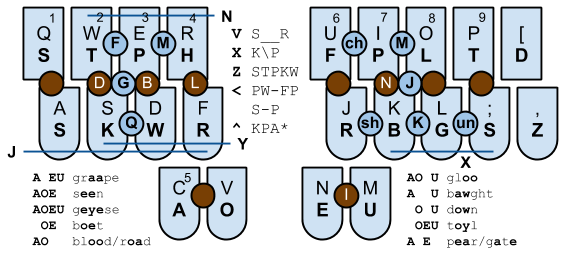
Some good examples:
This post was composed on Plover at a total speed of around four words per minute. It's rather hard going so far.
« Prev
-
Next »
 RSS Feed