2011-04-07
This post is for documentation only. It was going to be a rebuttal to jwh's Mercurial fanboyism but I realised while writing it and re-reading his post that I have absolutely no idea what he's talking about, nor can I work out how to get hg to tell me.
Given a repo of:
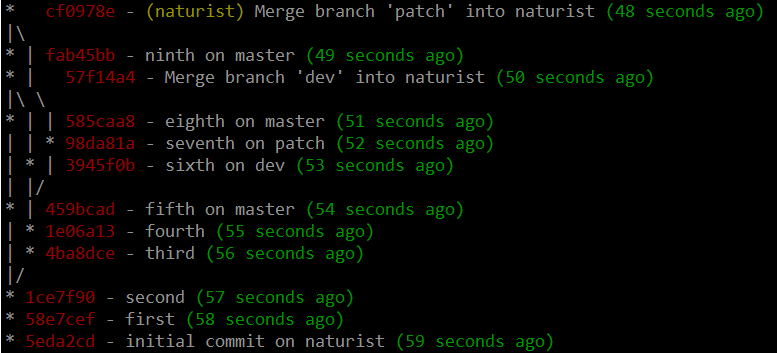
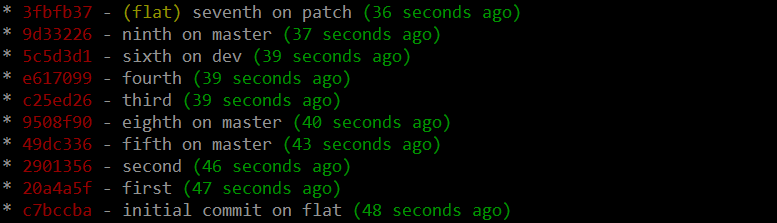
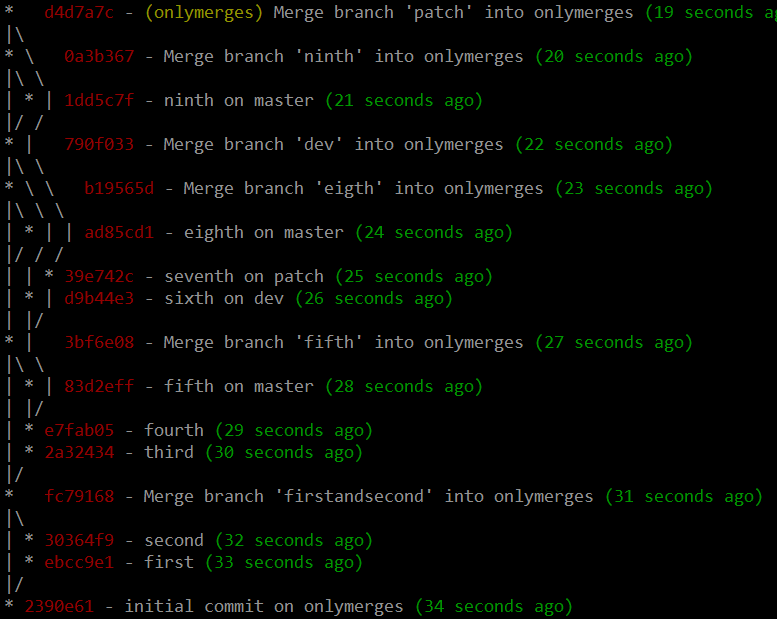
My proposals for alternatives to this simple workflow are as follows. These all result in the same order of code going into the master branch, but have different histories. (Actually, I think there's still mistakes in there but I'm tired of staring at the horrible procedural script that generates it, so it'll do).
1. A flat history, made by rebasing everything on top of master instead of merging:
2. Only merges on master, giving you the illusion of a neat history...

...but, underneath, loads of ugly information available:
3. A hybrid, supercommits, whereby you keep a flat history but you maintain where branches were:
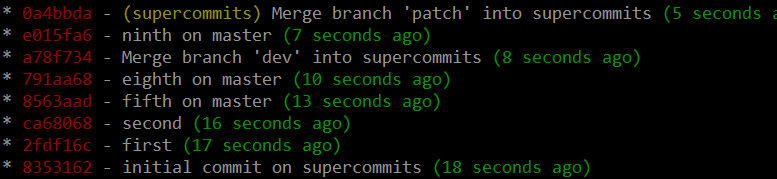
...or, with the history information visible:
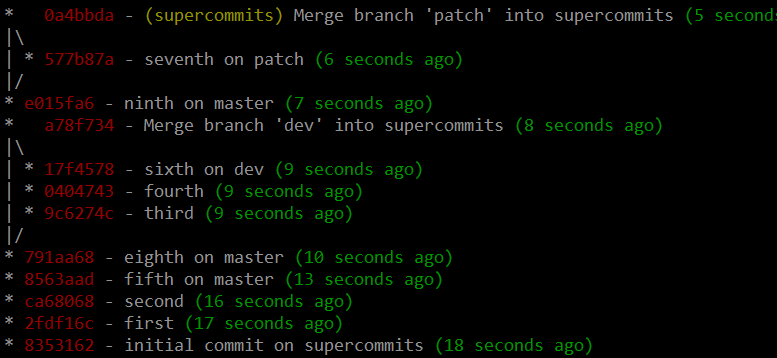
Thoughts:
Serious concurrent projects like git itself use the 'only merges on master' approach. I strongly agree that they shouldn't be flattening the history; it's nice to be able to see groups of patches as they go into master, and to navigate the history of "feature commits", instead of the history of "developer changes".
The flat model seems to work much more like how I think about software development:
- You start working on something.
- You do your normal develop, commit, developer-test, commit cycle.
- Master moves on a bit while you're messing around. The fact that you happened to start developing before a specific commit on master, instead of just after it (so it would be the root of your branch) is reasonably irrelevant; you may as well move the branch-root (or branch point) up to the top of master.
- Additionally, if you do a real merge, you need to test your changes. This leads to more developer testing, and possibly more commits.
- What do you do with these commits? Assuming your merge with master is still local you can fix it (this is git, you can fix anything), but it's inconvenient.
- When you've rebased, you can continue committing on your rebased branch like normal, with confidence that when you merge it'll all be fine (as it'll be a fast-forward merge).
'Supercommits' is a hybrid of these two; you can use the rebase-onto-master workflow from 'flat', but you can logically group your set of commits into a... family? I like this idea, but haven't really implemented it in practice so can't really comment.
(Apologies for screenshots of text; I'm lazy, ansifilter was NOT WORKING and it's prettier than gitk.)
2011-02-10
Many people find modern version control systems confusing. PatchPiler offers a new, simpler way to think about version control, offering you far more flexibility than certain other version control systems.
All software development is the creation of patches; small changes to the state of the software. PatchPiler's command-line tool, papi, lets you manage these patches efficiently.
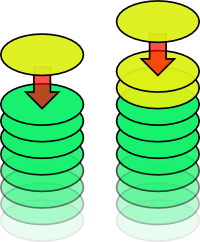
Like in other version control systems, papi commit adds a patch (yellow) to the existing stack of patches (green). As with any modern version control system, you can have multiple outstanding patches on a pile.
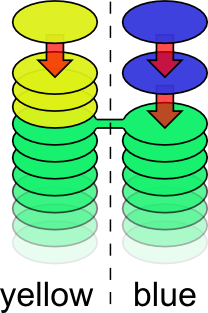
Sometimes you want to be working on multiple things at the same time, say yellow and blue things. For this, there's papi new-pile.
It lets you name your new pile, let's call it blue. This means you can pile patches on "blue" while continuing to pile patches on "yellow". This is amazingly cool. In fact, given that "blue" is completely unrelated to "yellow", somebody else can be piling patches on "blue" while you continue working on "yellow".
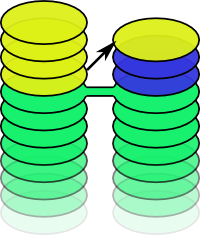
Frequently you'll want to copy patches between piles.
papi copy lets you copy a patch from one pile to another.
Something cool has happened in "yellow" and you want in? Just copy it across! The patch is now in both piles, but this is okay, as they're currently unrelated.
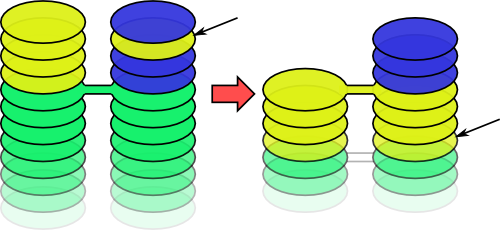
papi re-pile allows you to catch-up with another pile's entire history.
It just "re-piles" your patches on top of the patches from the other pile. This doesn't affect the other pile; it's still a separate stream of development.
Note how it intelligently works out that the yellow patch in "blue"'s pile was already included earlier on, so it's no-longer necessary to copy it in.
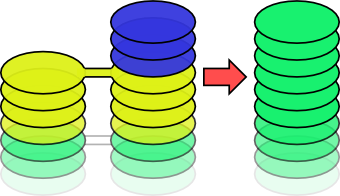
You'll notice that the pile named "blue" now has all of the outstanding patches; this brings us on to the last command: papi bless marks changes as complete and removes any unnecessary piles.
This results in a nice, clean pile of patches, leaving you ready to continue developing. The possibilities are endless!
Continue reading...
2011-01-29
As a continuation of bucko's progcomp chain, I set Progcomp 6.
The objective was to walk your way through a "maze" with huge constraints to make the problem simpler.
I believed the simplest solution to the problem was graph search with backtracking. My inefficient implementation (with debugging) of this is unbelievably fast; it can solve a 300x5000 map (>100 times the size of the original problem) in around 2 seconds. The map generator ensures there are no problems set with trivial solutions (i.e. going in a straight line all the way down the map). I thought that the effort of solving it by hand within the (6-second) time constraint would require far too much UI work, so keeping the problem size small enough to fit on the screen was fine.
I was wrong. So wrong.
bucko's Perl solution was first, after 15 minutes, with a tree search implementation. While easier to implement, this is much slower.
I'd carefully designed the page, submission process and timeout so that people who found curl / wget too much effort could submit the solution by copy-pasting; I could copy the result from the page (without the IE-only JS' assistance) into my solver, solve it, and copy the result back in ~5 seconds; hence the 6-second timeout. bucko's solution sometimes doesn't finish in time, even on these tiny maps. It'll never finish on the huge map.
fice was second, after 21 minutes. Algorithm / code unknown, although I'm guessing there was auto-submission as no User-Agent was set.
Queex (outsider!) was third, after about 50 minutes, with his Java solution. He decided the problem wasn't complicated enough to write a "proper" solution for, and went for just trying to jiggle away from the edges. Obviously it works fine, and I have no idea how to harden the map generator against it, except perhaps forcing you to go from the left edge to the right edge at least once. It can only solve some of the maps, but this isn't important as it was a "solve once" problem.
Next up was Afal's js solution. He (correctly) guessed that the map generator only generates large walls every 10 spaces, worked out which side it was, and jiggled away from it a bit. Apparently works most of the time. Again he uses an in-browser implementation to avoid having to do any page parsing or post rubbish.
Afal then decided to submit 62,000 other solutions, which has made my log huge and writing this a pain. Such a penis. Such a penis.
At this point an hour had passed and I turned the debugger on; when you die it tells you where and shows you what you submitted, etc.
james was next, with some more jiggling Java, and a shell-script wrapper.
MrWilson then submitted a travesty. It generates random solutions and assumes loads of things about the map. It works in nearly no cases. I don't know how he can show his face in public after this.
Connorhd duplicated bucko's solution in php.
sadiq, tom, Softly, Trencha and Steve Brandwood also had a correct answer.
Meta: I wrote my own solutions website instead of using bucko's. I got the logging all wrong. I got the map size all wrong (not realising how lazy everyone is).
It took me about 90 minutes to do the map generator and my solution with debugger, and verifier. Another 90 minutes was spent on the website. That is, a ~3 hour time investment for causing hours of suffering and an entire night of entertainment. Totally worth it.
Next up is bucko's progcomp chain, link 7, but tom still owes us a progcomp.
2011-01-18
I've been whining for a while about SpamFiles' speed on Windows. It creates and writes small amounts of data to hundreds of files, then deletes them all. It's orders of magnitude slower on Windows (all the way to Seven) than on Linux, due to NTFS.
It's just a synthetic benchmark though, right? That is, it's reasonably irrelevant. Or so I thought.
In a recent private project I was using Spring's JDBCTemplate with SQLite to write out a couple of hundred rows to an empty table. JDBCTemplate defaults to autocommit and it's non-trivial to convince it not to do so.
The relevant code and sqlitelulz.jar shows why this is a problem:
>java -jar sqlitelulz.jar 1000
Autocommit: 70.867652636 seconds
Manual commit: 0.107324493 seconds

$ java -jar sqlitelulz.jar 1000
Autocommit: 1.814235004 seconds
Manual commit: 0.075502495 seconds
Yes, that's 660 times slower on Windows (and only 25 times slower on non-ntfs). This time is entirely sqlite creating and deleting it's journal file.
Sadness.
2010-12-14
People often complain that git's commit ids are too hard to remember and that they prefer the sequential ones generated by inferior version control systems.
Stock git doesn't have an option to pick the commit id for a commit; this seems like a grave omission. I've prepared a patch which offers git commit --set-commit-id.
For example, everyone knows that the base commit in a repository should have a low number:
$ git init
Initialized empty Git repository in ./.git/
$ git add -A
$ git commit --set-commit-id 0000000 -a -m "Base."
Searching:  46% (12593/26843), done.
[master (root-commit) 0000000] Base.
 1 files changed, 1 insertions(+), 0 deletions(-)
 create mode 100644 myfile
If you've already messed up your repository, a handy fixing script is provided:
$ git lg
* fe5e2ee - (HEAD, master) work, work, work, it's all I do
* a2c1ec8 - work, work, work
* e580e5e - work, work
* a6ad5ee - work
* 0000000 - base
$ sequentialise.sh 0000000 6
Stopped at a6ad5ee... work
Searching: 39% (10468/26843), done.
[detached HEAD 0000010] work
 1 files changed, 1 insertions(+), 0 deletions(-)
Stopped at e580e5e... work, work
Searching:  174% (46706/26843)
[...]
$ git lg
* 0000040 - (HEAD, master) work, work, work, it's all I do
* 0000030 - work, work, work
* 0000020 - work, work
* 0000010 - work
* 0000000 - base
Much more usable! This example repository is available for inspection. gitweb doesn't show the commit ids on the log screen, but you can mouse-over and see them in the URLs.
Needless to say, this takes "a while". sequentialise.sh defaults to 5 digits, i.e. enough for a million commits, and is reasonably fast on modern hardware. 6 digits is rather less tolerable.
2010-08-04
I have an application that scales well up to around five threads a core, due to the mix of IO and CPU that it does.
That is, you give it more threads, and the throughput increases; the overall time goes down.
The following graph shows, in blue, the Sun's java.util.zip.ZipFile time to complete a set of unzips on an increasing number of threads:
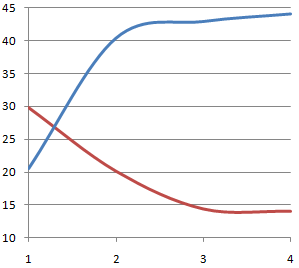
Wait, what the cocking shit.
Continue reading...
« Prev
-
Next »
 RSS Feed