2026-02-22
I received a failed Quooker Cube chiller unit.
Upon connection to power, nothing would happen; no lights, no sounds.
Slightly weird board layout, with the main voltage conversion "primary"
situated a significant distance from the mains input "power supply":
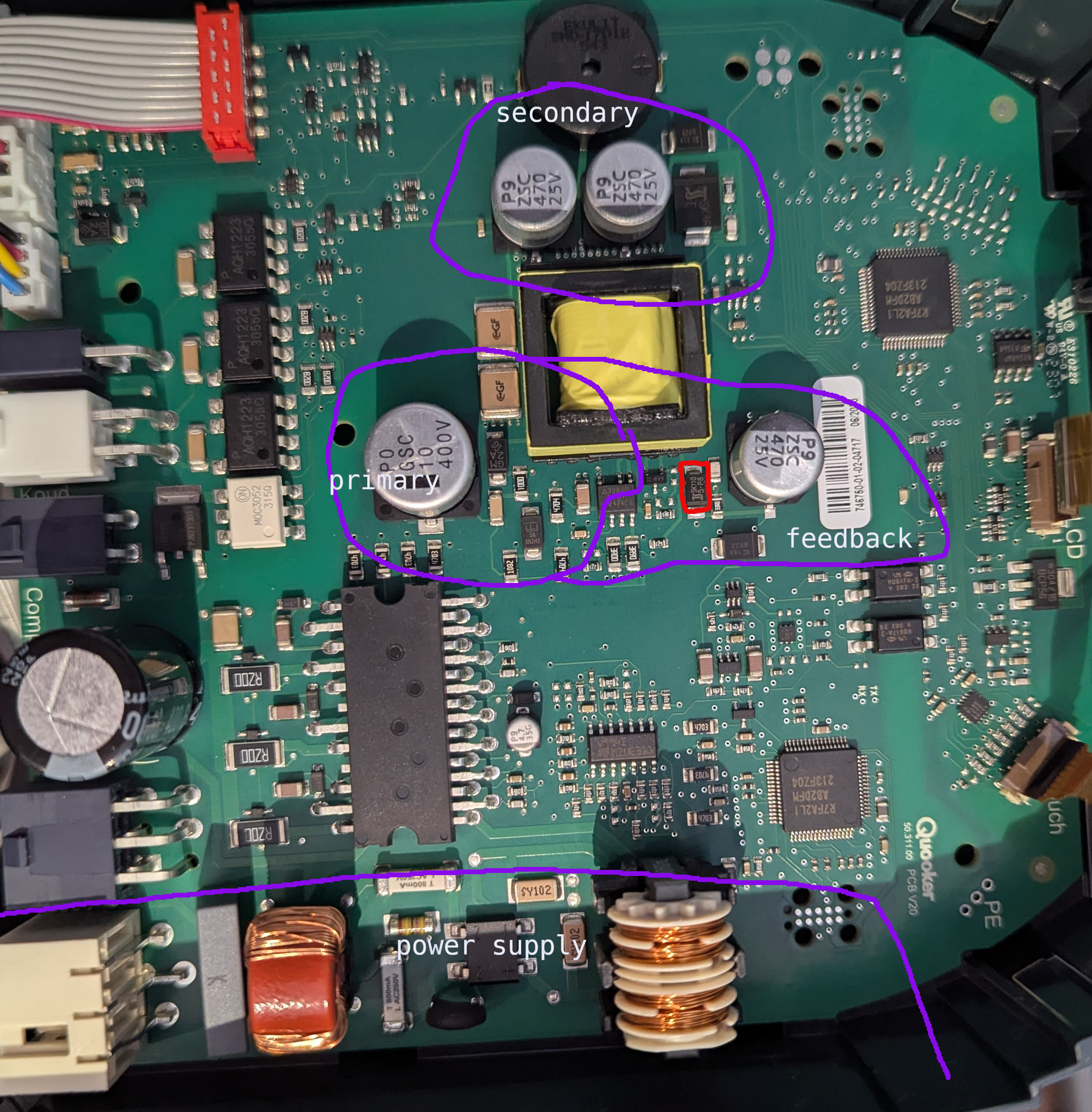
Investigation revealed the voltage on the secondary capacitors was only
around one volt. The rectification diodes test fine.
Investigating the feedback circuit, I noticed that the diode in red is
short circuit; 0 Ohm in both directions. Verified out of circuit.
I believe this is D5 for the AP3983R,
acting as the main power supply for the chip, from the feedback winding,
after R1/R2 provide the bootstrap.
By failing, it's pulling the feedback pin high, resulting in limited switching?
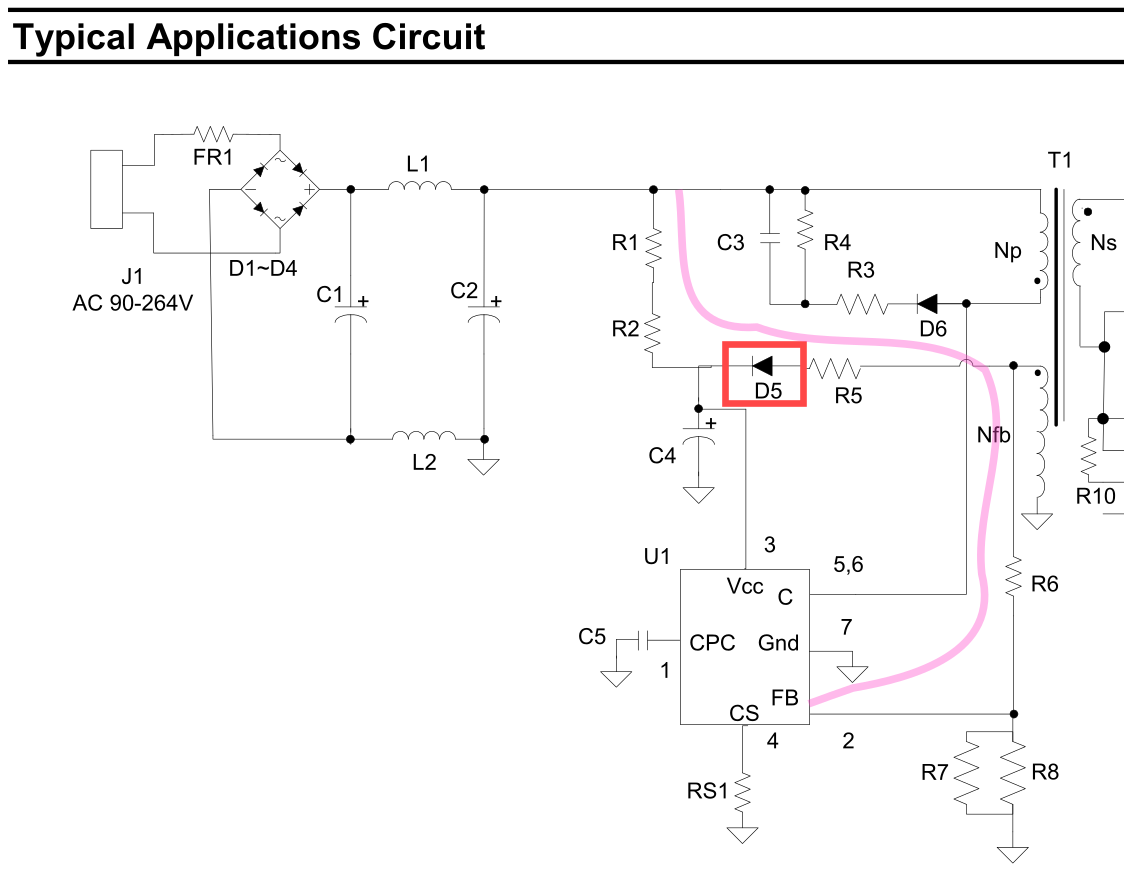
Removing the diode appears to have improved matters, but I await a replacement
before claiming a full fix.
2019-10-02
I am personally opposed to async, futures, promises; whatever you call it.
It is almost never appropriate for application or library development,
yet widely proposed as a good solution to problems. It
also
has
an
almost
amusingly
terrible
history
of integration and transition into ecosystems. I plan to explain my
complaints properly in a future post.
But, we still use it. Let's look at a specific example, in node,
which I call "Spooky Exit At A Distance".
Here, we have possibly the simplest async node application,
with the "logging prelude" we're going to be using:
async function main() {
  return 5;
}

main()
  .then((r) => console.log('returned:', r))
  .catch((e) => console.error('erroh!', e))
  .finally(() => console.log('application complete!'));
This prints the return value (5), and the application complete!.
(This "prelude" is here because you
can't use await at the top level in node,
which is mighty inconvenient here, but I'm sure they have their reasons.)
Let's add some "real" work to our example:
async function main() {
  const made = await new Promise((resolve, reject) => {
    // ... do some work ...
    resolve(2);
  });
  return made + 3;
}
This prints the same thing as the previous example, in a less direct way.
await causes us to hand-off control from main to the Promise, and,
when resolve is called, we "unblock" and resume running main.
But.. what happens if there's a bug in the do some work, and we don't
call resolve?
async function main() {
  const made = await new Promise((resolve, reject) => {
    // (there's like four different bugs here)
    switch (Math.random(2)) {
      case 0:
        resolve(2);
        break;
      case 1:
        resolve(3);
        break;
    }
  });
  return made + 3;
}
% node a.js
%
...the app just vanishes. Our then(), catch(), and finally() are
not run. The rest of main isn't run either. The exit status is SUCCESS.
As far as node is concerned, there is no code to run, and no IO is
outstanding, so it's done. Bye!
Note that this can happen anywhere in your entire application. Deep within
some library, on handling input, or only under certain load conditions.
Nobody would write code like that, you'd think. Unfortunately, much of the
ecosystem forces you to write code like this; it's pretty much the only
reason remaining you would write explicit promises. For example,
dealing with subprocesses:
await new Promise((resolve, reject) => {
  child.once('exit', () => resolve());
  child.once('error', () => reject());
});
What happens if neither of these events fires? Your app is gone.
I hit this all the time. unzipper took down a service at work occasionally,
probably this similar IO issue.
I hit the
subprocess issue using the library in the simplest way I can imagine,
reading the output of a command, then waiting for it to exit. Popular wrapper
libraries have pretty much the same code.
The solution?
After consulting with a serious expert, we decided
that the events probably don't fire (sometimes, under load) if they are
not registered when the event happens. You might expect this, I didn't.
You can resolve this by
moving the promise creation above other code, and awaiting it later.
This relies on the (surprising to me!) execution order of Promise constructor
arguments.
You can also have great fun looking at execution order in your test case.
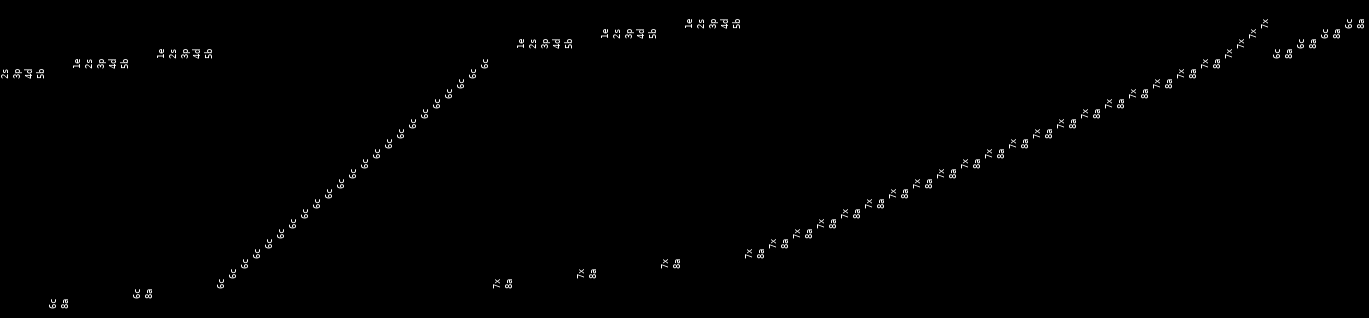
A row (in this picture, normally a column) is a job, which works from 1enter,
to 8awaited.
This recording shows all of the workers completing the read in a row (6c),
then interleaving of the function completing (7x, 8a), with new workers
starting (1e, etc.). Note how some of the jobs 7x (exit) before they
6c (complete reading), which is probably our bug.
2018-12-31
I have written a large mass of code this year, primarily in Rust.
With only one exception, none of this has reached the 'blog post' level
of maturity. Here lies a memorial for these projects, perhaps as
a reminder to me to resurrect them.
Github's contribution chart gives a good
indication of just how much code has been written. Clearly visible are
some holidays, and the associated productivity peaks on either side:

Some focuses this "year" (Nov 2017+):
Archives and storage
contentin and
splayers recursively unpack an
archive, supporting multiple formats. You have a gzip file, on an
ext4 filesystem, inside a
tar.bzip2 archive, inside a Debian package? No problem.
The aim here was to "ingest" large volumes of "stuff", either for
comparison (e.g. diffoscope, from the
Reproducible Builds project), or for indexing and search.
Speaking of which, deb2pg
demonstrates various ways not to build an indexing search engine
for a large quantity of "stuff".
While working on these, I became a bit obsessed with how bad gzip
is. gziping a file, then running it through any kind of indexing,
or even other compression, gives very poor results. Very poor.
rezip is a tool to
reversibly transform gzip files into a more storable format.
It... never made it. I could complain for hours. See the README.
Much of this work was done against/for Debian. Debian's apt is
not a fun tool to use, so I started rewriting it. fapt
can download lists, and provide data in a usable form (e.g. ninja
build files). gpgrv is enough
of a gpg implementation for fapt.
Once you start rewriting apt, you might as well rewrite the rest
of the build and packaging system, right? fbuilder
and fappa are two ways not to
do that. fappa needed to talk to Docker, so shipliftier
has a partial swagger-codegen implementation for Rust.
Networking
Much of the way networking is done and explained for linux is not
ideal.
netzact is a replacement for
the parts of netstat and ss that people actually use. It has the
performance of ss, but only one the horrible bugs: no documentation
at all. That one is probably fixable, at least!
pinetcchio continued into
its fourth year, I like to think I made it even worse this year.
fdns was going to do something with
DNS but I can't really remember which thing I was going to fix first.
There's so much wrong with DNS.
quad-image is an image hosting
service. It works, I run it. I even tried to add new image formats, like
heifers. That was a mistake.
IRC
I still use IRC. The protocol is bad, but at least there are working
clients. Slack Desktop still segfaults on start on Ubuntu 18.10, months
after release, because they don't understand how to use Electron and
nobody can fix it for them.
unsnap is an IRC title bot. Yes,
there are hundreds of others. No, I don't like working with other people's
untested code in untestable plugin frameworks. Thanks for asking.
badchat is some kind of IRC thing.
This one might still have some life in it.
CLI tools
zrs is a re-implementation of z, the
directory changing tool. It's good, you should use it.
sortuniq is a more efficient
| sort | uniq. It supports some of the flags that either tool supports.
This is probably enough of a blog post for that. I use it frequently.
2018-10-09
kill-desktop tries to get your
"X" applications to exit cleanly, such that you can shutdown, or reboot.
"Watch" the "demo" in the repository readme,
or try it out for yourself:
cargo install kill-desktop
Many people just reboot. This risks losing unsaved work, such as documents,
the play position in your media player, or even
the shell history in your shell.
This feature is typically built in to desktop environments, but somewhat
lacking in the more minimalist of linux window managers, such as my favourite,
i3wm.
Even the more complex solutions, such as the system built into Windows, do
not deal well with naughty applications; ones that will just go hide in the
tray when you try to close them, or that show dialogs a while after you
asked them to exit.
kill-desktop attempts to solve this problem by keeping track of the state
of the system, and offering you ways to progress. If one of these naughty
hiding applications merely hides when you close the window, kill-desktop
doesn't forget. It tracks the process of that window, waiting for it to go
away. If it is not going away, you are able to ask the process to exit. Or
just shut down. It's probably a bad application anyway.
Interesting learnings from this project:
Firstly, writing an interface was a bit of a pain. I wanted to be able to
prompt the user for an action, but also be able to show them updates. It is
not possible to do this without
threads,
as there is no way to do a non-blocking read from stdin. This surprised me.
You can't even read a single character (think Continue? y/n) without messing
with the terminal settings, which needs very low level, non-portable libraries.
There are nicely packaged solutions to this problem, like
termion's async_stdin
but this ended up messing with the terminal more than required (it puts it all
the way into raw mode, instead of stopping at -icanon). I
wrote my own.
Secondly, it's amazing how a relatively simple application can end up tracking
more state than expected, and
manually diffing that state.
I also spent time
moving errors to be part of the domain,
which isn't even fully surfaced yet. It amazes me how much code ends up being
dedicated to error handling, even in a language with excellent terse error
handling. (Terminology from
Feathers.)
It's also ended up with nine dependencies, although between four and six of
those are for loading the (trivial) config file, which could be done better.
2018-01-25
The world's understanding of cryptography, the guarantees provided,
and the practical safety and limitations, is lacking.
Cryptography, and computer security in general, is discussed in terms
of some use-cases. A use-case is addressed by combining some
primitives, and there's frequently multiple different algorithms which
can provide a primitive.
First, let's look at some use-cases:
- I want to do some banking on my bank's website.
- My bank wants to know that my genuine EMV ("Chip and Pin") card
is doing a purchase.
- I want to store a big file privately, but only remember a short password.
- I want the recipient to know that it was actually me that wrote an email.
None of these mention cryptography, or even really that security is expected,
but the requirement for security is implied by the context.
Let's pick one of these, and have a look at what's involved: "I want to store
a big file privately, but only remember a short password.".
This normally comes up with backups. You want to store your data (your family
photos?) on someone else's computer (Amazon's?), but you don't trust them. You
want to remember a password, and have this password (and only this password) be
able to unlock your precious data.
This is normally realised by:
- Making a key from the user's password.
- Using this key to scramble and protect the data.
Those are our two primitives.
After these steps have been applied, it should be impossible for anyone to
un-scramble the data without guessing the password. It's also impossible for anyone
to modify the data without us realising.
Everything one of our use-cases, and the vast majority of use-cases in the real
world, can be built from a small set of primitives. Here's a list, including the
two from above:
- Deriving a key from a password.
- Using a key to scramble and protect data.
- Agreeing on a key with an online, remote computer you know nothing about.
- Protecting something, such that it can only be read by someone you know something about.
- Proving you wrote something, given the other computer already knows something about you.
That's it. Those are our operations. Now, we can build the whole world.
But first, a quick note on security: In the modern Internet era, since ~1993 (25 years!),
only #5 has ever been practically attacked in any way. The others are practically perfect.
There have been lots of security problems, and things have had to change to remain secure.
These have mostly been:
- Computers have got fast enough that it's been possible to increase some of the
"security parameters" in some of the primitives, long before computers have
practically been fast enough to actually hurt any of the primitives.
- People have used weaker primitives, or kept old or weak systems running long past
when they should have been turned off. That, or they have been
legally mandated
to use these weaker systems.
- Software bugs. The primitives are complicated, built from lots of algorithms, and the
algorithms are hard enough to implement correctly on their own. It's hard to test, too!
A lot of components are
much more complicated than necessary,
but we're bad at fixing that.
- Problems with algorithms which don't translate to real world problems for most
use-cases, or that are easy to mitigate once discovered, assuming the relevant people
actually adopt the mitigations.
Now we understand what we have to build stuff from, let's try and attack the hardest
problem: "I want to do some banking on my bank's website."
2017-10-17
Once again, I have ordered the wrong hardware from eBay.
This time, it was a set of 433MHz radio transceivers for "Arduino".
The majority of these come with embedded circuitry for sending and
receiving bits. The ones I ordered, however, did not.
The transmitter emits power when its data line is powered. The
receiver emits a varying voltage, which can be ADC'd back into
a value, ~1 -> ~800. This is not digital.
I decided to do everything from scratch. Everything.
A useful simple radio protocol is known as "OOK" or "ASK":
You turn the radio on when you're sending a "1", you turn it
off when you're not.
The transmitter
is amazingly simple; you turn on the radio, and you turn it off.
These fourteen lines of code actually send two bits, for reasons
which will become horrifying later.
Or now. Radio is incredibly unreliable. This is worked around
by layering all kinds of encodings / checksums together, and
hoping everything works out. (Narrator: It doesn't work out.)
The first type of encoding used is called "Manchester Encoding".
This involves doubling the amount of data you send, but gives you
lots of scope for detecting problems. For a 1, you send 01,
and for a 0, 10. That is, if you see a 111 or a 000 in
your stream, you know something's gone wrong.
So, to send the number 6, binary 0110, we're going to send
10_01_01_10. This is why the sending code
sends two bits.
The receiver's job is much more horrifying. The receiver has
"samples" from a radio (a three-digit integer), at unknown time
intervals. The minimum value read varies wildly with environmental
conditions, as does the peak value (the value you hope to see
when the transmitter is sending).
For this purpose, the receiver has multiple levels of filtering.
First,
it takes a fast moving average over the received signal,
and a "slow" moving average over the background noise (the average
of all samples), and our guess as to the high value.
If the fast moving average is greater than half way up this band,
it's probably a hi.
This can be observed in the code by enabling DEBUG_BACKGROUND,
and rebooting the board. This initially has a bad idea of what
the noise environment looks like, so will look like this:
background: 8 sig_high:99 high:47 trigger:53 -- ..XXX.XXXXXXX.XXXXXXXXXXXXXXX...................................XXX.............................................................
background: 6 sig_high:96 high:87 trigger:51 -- .....................................................XXX....XX..................................................................
Here, it's got a very narrow range, so triggering too often and
emitting lots of nonsense bits (the XXXs). After a while, it will
adjust:
background: 28 sig_high:159 high:757 trigger:93 -- XXXXXXXXXXXXXXXXXXXXXXXXXXXXXXXXXXX....X..XX..XXX...............................................................................
background: 27 sig_high:163 high:450 trigger:95 -- ................................................................................................................................
background: 26 sig_high:165 high:26 trigger:95 -- ................................................................................................................................
Here, its background estimate is higher, but its sig_high estimate
is much higher, so the trigger is higher, and it doesn't
incorrectly trigger at all. (Those XXXs are part of a real signal.)
Second,
we "decimate" this signal down a lot, by taking a binary average of
finite blocks. As the sample rate is still significantly higher than
the length of a bit, it does not matter that these are not well
aligned. We then count the length of runs of each state we see,
ignoring single errors and overly long runs.
As Arduinos, and the radio hardware, don't do anything like what
you tell them, it's impossible to know in advance how long (in
milliseconds) a pulse will be, or how long of a run represents a
1.
Fixing this problem is called "clock recovery", we need to guess
how long a pulse is according to us, regardless of what the sender
thinks it's doing.
Manchester encoding helps with clock recovery. The transmitter
sends a "preamble"
of zeros, which are encoded as 10101010, that is, a series of
pulses. The receiver uses this
to guess how long a pulse is, and to check the guess is correct.
This code is looking for a high (and keeping the length of this
high), then a low of the same length, then another high/low.
If we see these, then we're reasonably confident we're
synchronised to the signal.
There's a DEBUG_CLOCK which watches this phase working:
7: (XXXXXXX_.......) 0 (XXXXXXX_.......) 0 (_XXXXXXX_..............) 0 (_XXXXXXXXXXXXXX) 1 (...................) end (encoding violated)
Here, it's guessed the length of seven, then seen a two normal
valid 0s, then a 0, 1, with the double-length 0 pulse in
the centre. After this, the transmitter went silent, and hence
we saw a stream of 000s. Three zeros is invalid in Manchester encoding
so we stopped decoding.
So! We've got a stream of bits, and an end. From this, we need
to find the start of the message. I've chosen to implement this
by sending a long stream of zeros, then two ones, then immediately
the data. This scheme doesn't seem ideal, but it does work.
The decoder waits for this condition to happen,
then starts to read bytes.
The bytes are transmitted as 8-bits (MSB last, unlike normal),
with a parity bit. This explains the
last piece of unexplained code
in the transmitter!
There's also a debugger for this, in DEBUG_DECODE. Here,
we can see it waiting for XX (the second accepted X is
bracketed), then reading the next nine bits and checking the
parity. Note that there's no synchronisation for the second
byte, as it's assumed we're still synchronised:
..X(X)...XX.... => 24 (parity: 00)
X..XX..X. => 153 (parity: 00)
X......X. => 129 (parity: 00)
Here, a failure looks like:
X(.X(..X(X)..X.X.... => 20 (parity: 00)
..X.X...X(X)...XX.... => 24 (parity: 00)
To be honest, I have no real idea what's gone wrong here.
The cleaned up data stream looks like 101001100101000000101.
The 001100 could be synchronisation, or it could be the
encoded "24". Argh! Why would you pick this sequence for
temperatures?! Why?
The actual data being sent is a temperature reading, encoded
as two bytes, (int)Celsius, and the decimal part as a single
byte.
As corruption was still getting through at this level, an
extra checksum is computed, as the xor of these two bytes
together. Finally, it's mostly reliable. With all the debugging
disabled, it looks like:
Value checks out: 24.70
Shame the temperature sensor varies (by about 2C) from my other
sensors. It also loses about half the messages to errors, as
there's no error recovery at all.
Wasn't that fun?
- What would a normal software decoder look like for this?
Probably about as bad. I wrote an example FSK decoder as part
of a radio manipulation tool I wrote, named quadrs.
- How far is this radio transmitting?
Um.
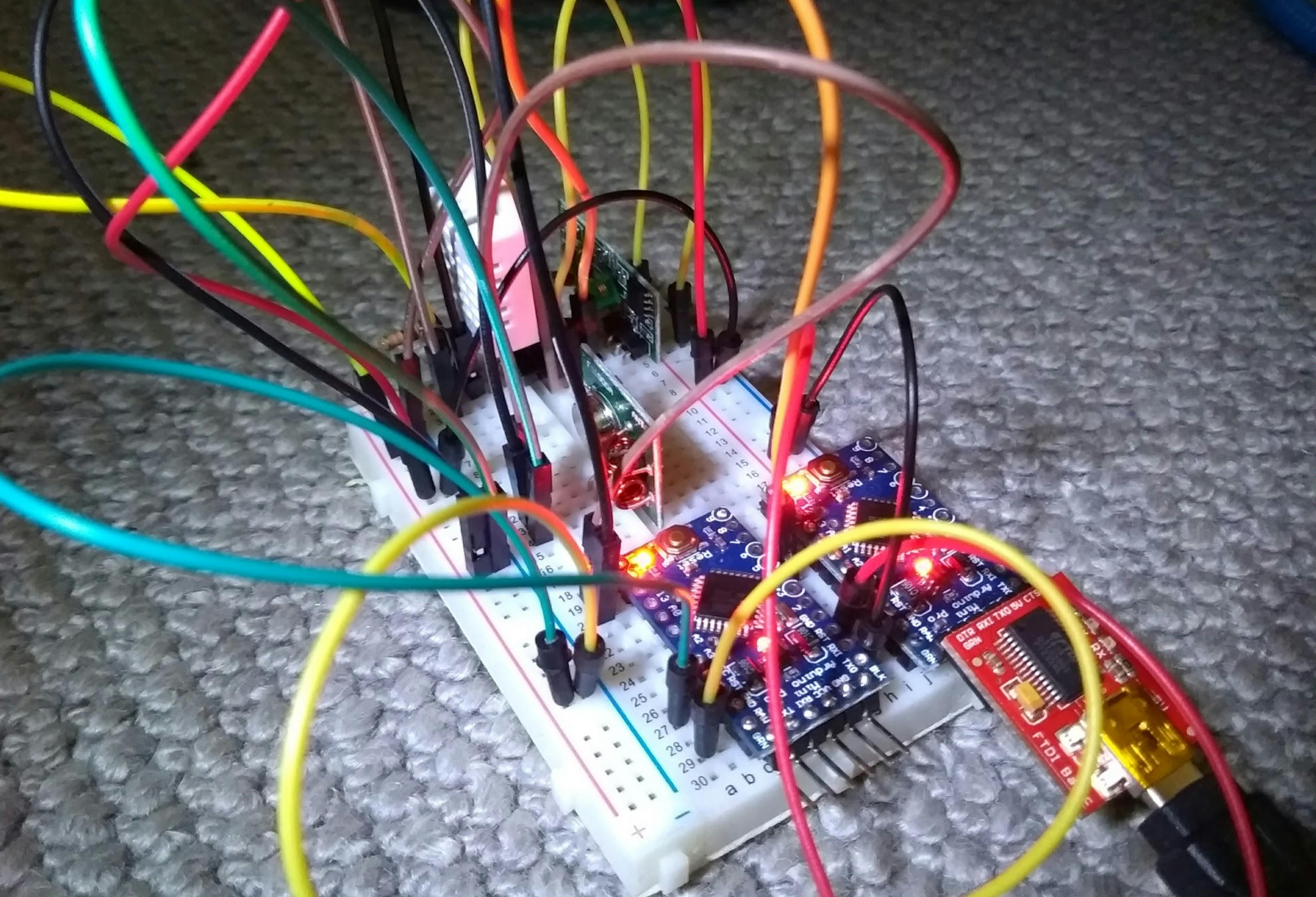
About three centimetres.
Horrendeous.
-
Next »
 RSS Feed