2009-04-13
I diagnosed an interesting problem at work recently; our application, when running on some enterprise platforms was eventually (over a number of days) running out of memory, grinding to a halt then fatally OutOfMemoryErroring, regardless of how much heap it was given.
Eclipse Memory Analysis Tool (via. DTFJ for the IBM heapdumps) is rather resource hungry, needing massively increased the heap (~7gb, i.e. can't be run on an 32-bit machine) and stack size (~8mb). However, once the heap dump had been loaded (1h+), it was reasonably obvious (after #266231) what was happening:
The finalizers wern't being processed fast enough.
The finalization thread is run at a lower priority, and, seemingly, on the configurations on these machines/OS/JVM combinations, it was getting no time at all.
For historical reasons, quite a few large classes in our codebase have:
void finalize() {}
..in, that is, finalizers that do nothing at all. These empty finalizers still have to be run before the object can be collected, however, so they simply wern't, quickly leaking memory. The more that was leaked, the slower the JVM was running, so the less time the finalization thread had, a vicious cycle.
I couldn't find many other people experiencing this on the internet, I can only assume that people simply don't use finalizers, which can only be a good thing.
One guy had a rather more interesting solution:
public static void main(String[] args)
{
  new Object()
  {
    @Override protected void finalize() throws Throwable
    {
      super.finalize();
      Thread.currentThread().setPriority(Thread.MAX_PRIORITY);
    }
  };
  // ...
}
The worst thing is, I can't really see any disadvantages to this...
2009-04-13
Google seem to be of the incorrect opion that you want your machine infected with Google Update.
The Google Earth download is actually just a cunningly disguised Google Update installer, and it seems to think it needs elevation.
It extracts %TEMP%\GUXXXXX.tmp\GoogleUpdate.exe, then tries to run:
GoogleUpdate.exe /install "appguid={74AF07D8-FB8F-4d51-8AC7-927721D56EBB}&appname=Google%20Earth&needsadmin=true" /installelevated
Instead of this,
GoogleUpdate.exe /install "appguid={74AF07D8-FB8F-4d51-8AC7-927721D56EBB}&appname=Google%20Earth"
..will happily download and extract Google Earth to %TEMP%\7ZipSfx.XXX. This is the unpacked offline installer, but the installer itself still attempts to elevate. Luckily, it's already unpacked, in:
%TEMP%\7ZipSfx.XXX\program files\Google\Google Earth
Just copy this folder to somewhere convenient and run googleearth.exe.
--
For reference for other apps, the quoted argument to GoogleUpdate.exe is the last "line" in the downloaded GoogleEarthSetup.exe.
2008-12-22
In Windows Vista, Microsoft added manifests, a way for developers to require that their applications run as administrator, or not at all. This takes control away from the user, me, who I trust, and gives it to some developer (who I might not). While it's possible to edit the file to remove these manifests, this is hard to do safely and automatically.
I thought it'd be fun to directly fix the problem.
It seems that, like some other things, as far as I can see, there's no support for this.
Luckily, it's an even smaller patch than last time. I won't show it, it's simply erasure of a jmp. It's a terrible solution to the problem, and the binary only contains fixes for kernel32.dll as seen on x64 SP1 and x32 SP1 as of now, it could break at any point. I implore nobody to use this utility seriously.
noelev (asc) (cpp) (pdb) works much like the reverse of the unix "sudo" command, running a command via. it makes it run without elevation.
It's not infectious, so it won't work for all applications (like some setup applications that unpack other installers), and, of course, some applications actually don't work without elevation.
A lot of Windows components actually appear to cope relatively gracefully with the unexpected lack of permissions, unlike, say, the nVidia components. I was hoping to find an entertaining failure to screenshot, but they're all boring. :(
2008-12-14
I decided on Thursday that I don't actually use my right-thumb for any keys whilst typing, my left exclusively operates the space-bar, and there are no useful modifier keys on the right-hand side of a Microsoft Ergonomic 4000 Keyboard.
I decided to add something useful:

If you can't tell by the head, it's the remains of an xbox 360 controller:
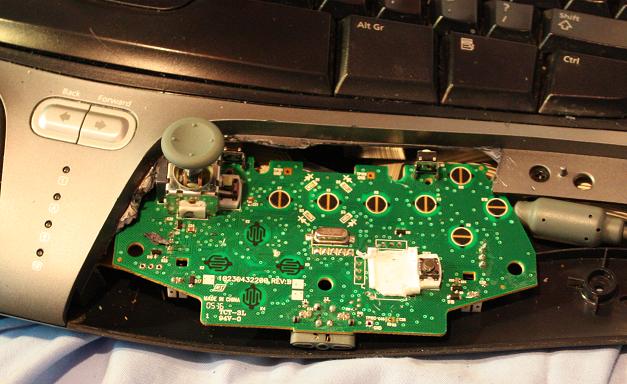
This, combined with a modified version of mousex gives you an almost usable mouse.
Now I just need to train myself to use it.
As an aside, I used to be worried about damaging the wrist wrests and the other pieces of the body (both of which you can see mutilated above). I am no longer, they're almost indestructable. I had to switch from a craft knife to a stanley knife to get through the faux-leather on the wrist wrest.
2008-10-28
I encountered an interesting issue today.
I work with some code that relies heavily on the database it backs on to. Today, it was backed onto Microsoft SQL Server. Right after starting, it would deadlock.
Looking at the stack of randomly picked threads I found that one was waiting indefinitly for the server to return.
A quick glance at the SQL Server's Activity Monitor revealed that "process id" 3, was waiting for "process id" 1. "Process id" 1 was sleeping, but in a transaction.
That's helpful, I thought, I now know the problem, "process id" 1. So, where's it happening in code? Uh oh.
I poked around, and noticed that com.microsoft.sqlserver.jdbc.SQLServerConnection (no, not com.microsoft.jdbc.sqlserver.SQLServerConnection) has a piece of private implementation called transactionDescriptor, an 8-byte array including the process id on the SQL Server. I set a detail formatter to show just this value.
Following this, Eclipse's find all instances command comes into play, allowing you to search for all instances of SQLServerConnection, then all references to the specified connection. Both of these are only available in Java 6 and above, otherwise the command will be greyed out.
From here, you can (manually, as far as I know) search through the stack trace and hopefully find that one of your threads has the above class (or a class that refers to the class, or a class that refers to a class that...) in it's trace; the culprit.
A mere hour of my day, gone. :|
2008-10-22
Tonight marks the first public release of Taglib Property Handler, an Explorer extension for Vista that allows it to read metadata from many audio file types:
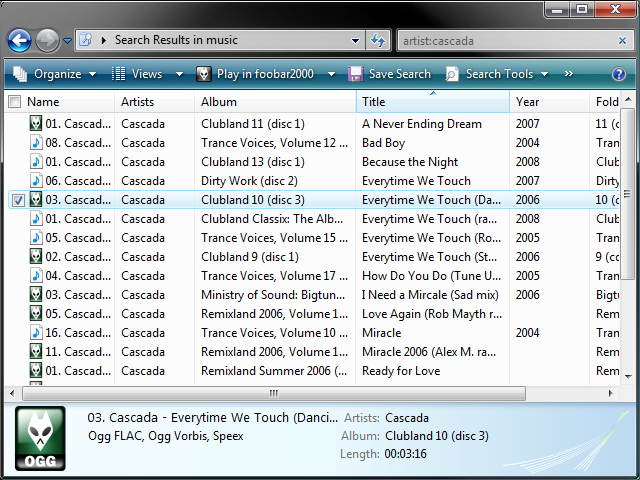
Currently, it's fully read-only, so there's minimal risk to your data, and the default install doesn't cause you to lose any existing functionality.
The list of supported properties shows what the default handler supports for MP3 and WMA, and what TLPH supports so far.
This release comes after four months of swearing at Microsoft for the entire property handler system being impossible to debug. Four months ago I had the handler working in Windows Explorer, but Windows Search would refuse to show any properties it provided. There're plenty of articles on debugging this situation, which I ran through hundreds of times, in the end this turned out to be caused by:
- Explorer accepting VT_BSTR and Windows Search not; solved by switching to InitPropVariantFromString.
- Stupid mistakes with pointers. Oh, how I hate you.
« Prev
-
Next »
 RSS Feed